How to add multiple movies / titles to one DVD using Nero Recode 2 PDF Print E-mail

Many people are asking me how to put 2 or more movies to one DVD or how to add titles from different DVDs into one recordable disc, so I decided to write this series of guides dealing with that. Note that I do not suggest to use one disc for more than two movies. Even with two movies in one disc, YOU ARE going to see a big difference in quality from the original. If the movies are both over 100 minutes, I suggest you don't join them to 1 disc.
Of course as I always say, try and see, maybe you find the quality OK, and continue using this method. Before you start be sure that you have ripped all the DVDs you want to use in your hard disk (guide here). If you have already done so, start reading the guide!

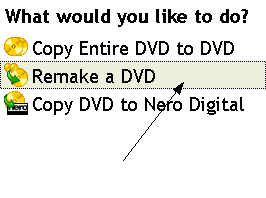
 

First of all open Nero Recode 2. In the first menu, select Remake a DVD.

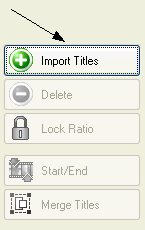
The main window of Nero Recode 2 opens. Select Import Titles.

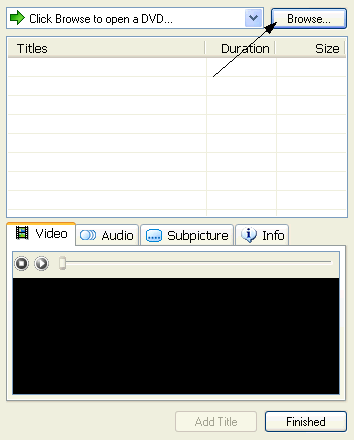
Click Browse to find the folder that you have the DVD files in.

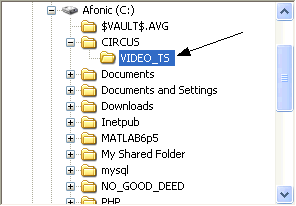
Locate the first DVD folder you should have in your hard disk and select the VIDEO_TS folder or the folder you have all the DVD files in (make sure you have different folders for different DVDs!).

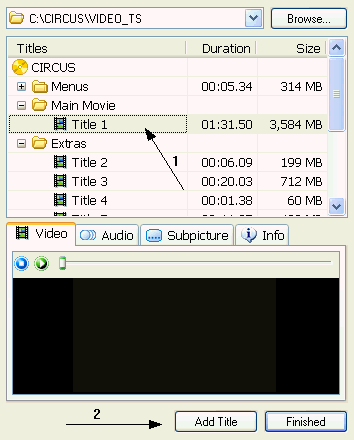
Recode will analyze the DVD. After it's finished you'll see something like this. Just select the titles you want (1) and click Add Title (2) to add them in the project. You can use the small preview window to check out what every title contains.
After you're done with this DVD click Browse again and select the folder of the second one. Follow the same steps to add as many titles you want from as many DVDs you want. When you're done click Finished.


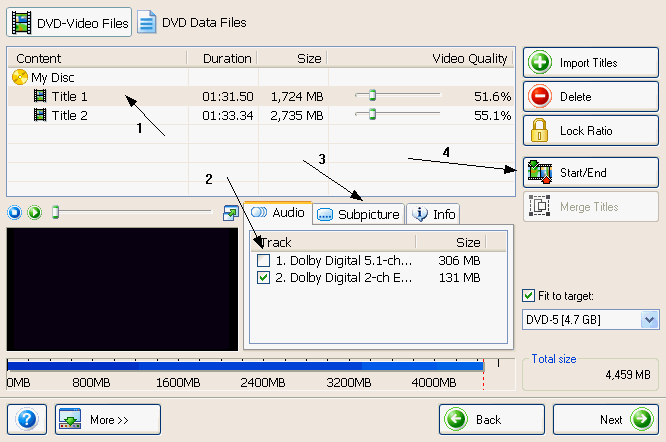
Now select the first title. (1) Then remove all the audio tracks you don't want and leave only one (2). Be sure you do that, especially if you want to add two movies into one disc, it saves a lot of space. Also remove the unwanted subtitles (3). Repeat the same for the other titles as well. Again, if you are adding two movies into 1 disc click Start / End (4) and see the next step for details. If you are not just skip the next step and click Next.

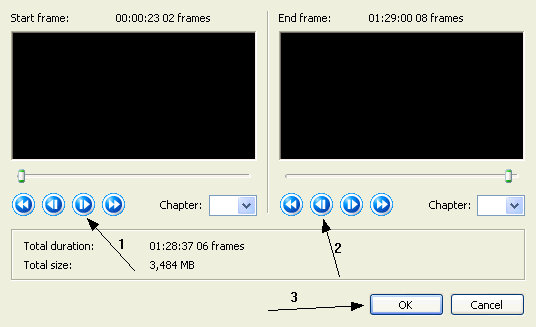
Here using the forward (1) and backward (2) button remove all the introduction screens and credits to save space. Then click OK and when you're back to Recode's main window click Next.

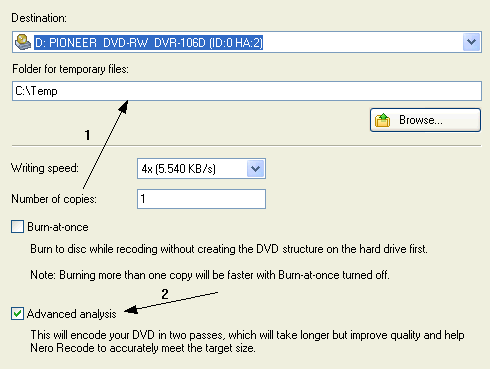
We are finally in the burn options. (1) select the destination and the temp folder. Make sure that if you join two movies into one disc you select Advanced analysis (2). It may take some more time, but the quality will be improved. Finally click Burn and you are set!
Comments (11)Add Comment
Creating menus for compiled DVDs.
written by SumTingWong, April 30, 2007
I love this remake/compile feature of Nero Recode. This feature lets you trim the titles any way you want and still let you keep the original chapters. If dispace permits, there's no re=encoding either!!!

One thing that bugs me a lot is that there is no capability to create new menus for a compiled DVD in Nero Recode. Does any body know how or what software will let me simply add a new menu to this compiled DVD (preferrably advanced menu with motion thumbnail, etc...)

Ulead DVD MovieFactory or Nero Vision will let me create menus but I have to import my compiled DVD into those programs and lose my original chapters not to mention risking re=encoding the entire compiled DVD wasting time a lot of time. Thanks.
adding menu's in nero recorde
written by monalbert, May 01, 2007
i just want to add multiple dvd titles and movies into one dvd, but when i used "copy multiple dvd-video movies to one" in nero, I canot find or fifure out how to put menus in the start of the movie because it play simultaeneously in my player. Is there anyone who can help me to put munes in this type of onfilation of movies in one dvd? Is there any applications or software or any program should I use to do this?
Hoping you can help me
Recode Essentials
written by Kael, June 29, 2007
Hi I wanted to follow this guide to merge 2 old cartoons on one disc.
The cartoons themselves were never recorded with much more then vhs quality (old don bluth movies like secret of nimh). So I want to test this, see how much the quality is actually impacted since the source material was never dvd quality anyway.
But I run into an issue very early in your guide. When I click import titles button and browse to one of the video_ts folders on my hd I don't get to see any files and the add button is greyed out.
Is this because I have nero essentials? smilies/sad.gif if anyone has some helpfull idea's to ty out please reply.
...
written by amd007, October 13, 2007
How can I add more than 2 compressed AVI movies(like divx, xvid), to one DVD?
...
written by Hans Uetz, December 18, 2007
works pretty good the outlay on my version of Nero was a little bit different but the results wre good just have to go under menu on the dvd player to select teh files when watching them on tv. Didnt use the encoding part because I had already sized the files with another program....thx for the help....
Start Menu
written by RexLUTHER, May 03, 2009
How to create the menus on the start?
http://inuggshopping.com
written by UGG fashion online, December 05, 2009
smilies/grin.gifsmilies/grin.gif Nobody want to reject discounts.Especially Discount40%-50% off.
...
written by GEEkon, December 14, 2009
use pepsky 5.2 waaaaaaaaaaaaaaaaaaaaaaaa
smilies/grin.gifsmilies/grin.gifsmilies/grin.gifsmilies/grin.gifsmilies/grin.gifsmilies/grin.gifsmilies/grin.gifsmilies/grin.gifsmilies/grin.gifsmilies/grin.gifsmilies/grin.gifsmilies/grin.gifsmilies/grin.gif
http://www.valgoods.com/
written by http://www.valgoods.com/, January 27, 2010
I love this remake/compile feature of Nero Recode.smilies/smiley.gif
how do they insert so many movies in just one DVD
written by Aakash, March 02, 2010
how do they insert so many movies in just one DVD
how can i make the menus??
written by bibaw, April 04, 2010
like "selecting chapters"?

Write comment
smaller | bigger

security code
Write the displayed characters


busy
 
DVD-Guides.com on Facebook

Who is online

We have  guests and 0 members online
No users online.