How to copy a DVD-9 using DVD Shrink 3.2 PDF Print E-mail

The 3.2 version of DVD Shrink introduced many new features, enough to make the need for a new guide essential. In this guide we are going to see how to copy a DVD using DVD Shrink and the new features and settings.
For those that do not know what DVD Shrink is: it is probably the best DVD copy application out there today! It is freeware, it includes many advanced quality features and also a CSS ripper, which means you can copy protected discs. You can download it here. Install and start reading this guide!

Unfortunately DVD Shrink development has ceased for a couple of years now. Many new DVDs contain protections that it cannot unlock. In case you have trouble you should try ripping the DVD first with a decent program, like DVDFab HD Decrypter (freeware) or use the excellent CloneDVD 2.


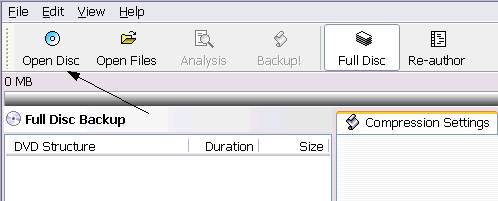
When you first start DVD Shrink you need to load the DVD. The Open Disc button will open a DVD disc you have in your DVD reader drive, the Open Files button will load DVD files you have in a folder in your hard disk. We are going to use Open Disc for now.


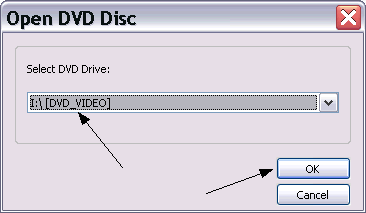
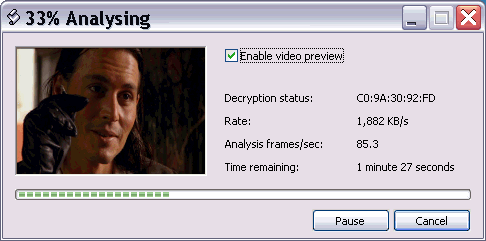
Things are pretty simple here. You just have to select the drive you have the DVD in and then click OK. Then DVD Shrink will unlock and analyse the DVD before you continue. If you have trouble loading the DVD here, try to play the disc for 30secs with your DVD playback software and then try loading again.


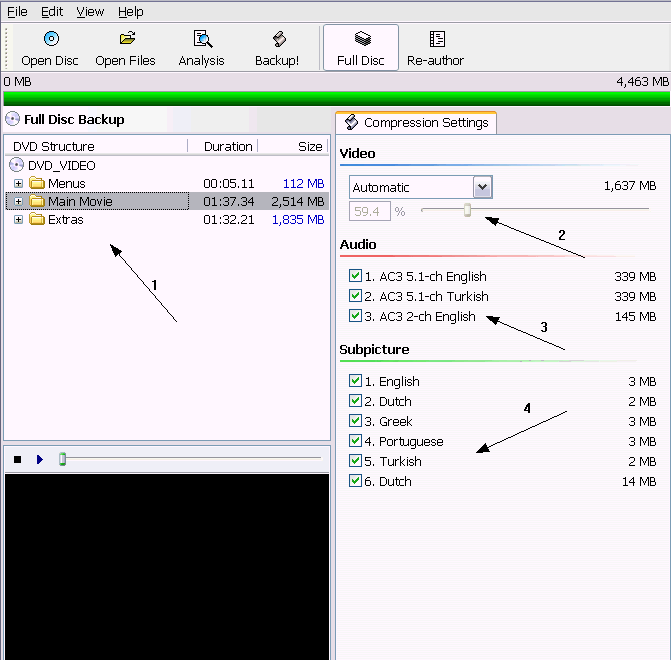
This is the screen you'll see after DVD Shrink has loaded the DVD.
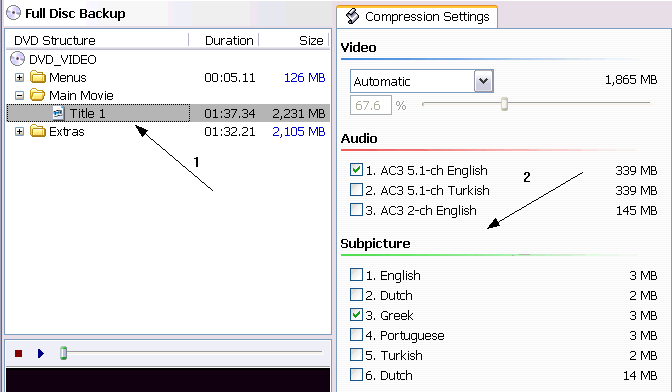
(1) These are the contents of the DVD by category. If you select the category you can edit all it's content as I have done here. I you want to change the settings for each video track seperately you can click on the + sign and select each one of them. When you select one track or category you can change the settings in the right, that we are going to explain right now.
(2) Here you can select the compression. The bigger the % number is, the better quality you'll get. The options here are Automatic, that selects the right compression to fit the DVD automatically, Custom Ratio, which lets you select the compression you want (usually used in the extras to lower the quality and gain a little bit in the movie). Keep in mind that you need to have a look at the green bar you can see in the top and make sure that your project fits into a single DVD. Over options are Still Image, which replaces the video with an image and you use it when you want to remove that video track and Still Pictures, which replaces the video with compressed pictures from the movie taken evey few seconds (pretty useless, unless you want to keep the audio).
(3) Here you can select the audio tracks you want to keep. Be careful as some tracks may be director's comments, view the DVD to make sure what is what and make the right selection.
(4) Here select what subtitles you want to keep. Even if they seem small, they take some space, so keep the ones you really need.
Let see an example.


For example here I have selected the main movie track. (1) The compression is set to Automatic (2) and I have just selected one audio track and one subpicture stream. Note because of the removal of 2 audio tracks and 5 subtitle streams the quality of the main movie has raised from 59,4% it was in the picture before to 67.6% now.

Let's demonstrate some things you can do with DVD Shrink before we show how to start encoding!


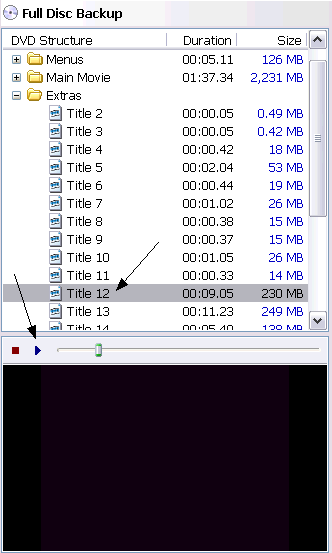
When you're unsure about which tracks to keep and which not you can use DVD Shrink's preview feature. Just select the track you want and then click Play in the preview area. You can now watch the track and decide weather to keep it or not!


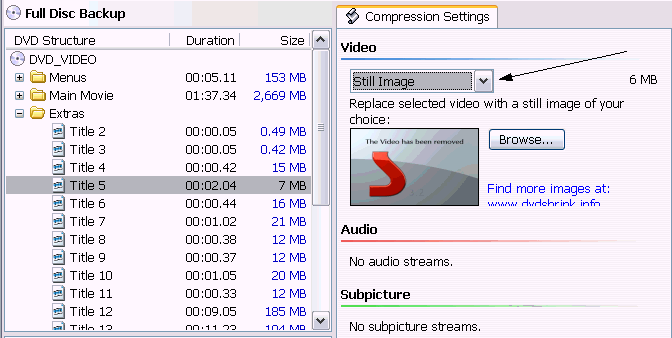
Every track you don't want to keep, you can just replace it with a still image. Removing it doesn't exist because that would change the DVD structure. But you don't have to worry. Just select the track you want to remove (all the whole extras category if you want to remove all extras), then select Still image in the video compression drop-down menu and that's it! You can even select your own image to use by click the Browse button!


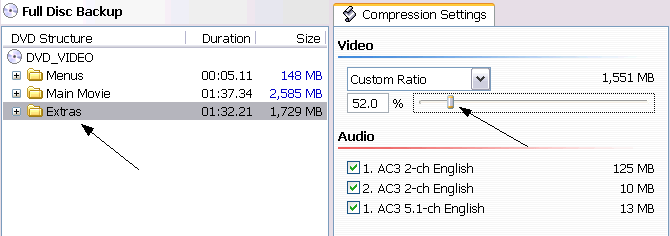
Finally if you want to keep the extras it would be a good idea to reduce their quality (do the same with the menus) so that the main movie - which is the thing you should always give your attention - has better quality. To do that just select the category (menu or extras or both of them) and in the video drop-down menu select Custom Ratio. Then move the slider to the left in order to decrease quality. Make sure you have set the main movie's setting to automatic so that it increases quality automatically when you lower the over parts of the disc. Also make sure the bar in the top is green - a red edge means that you are over the limit, while a grey one means you are not using all the available space.
When you have done all the settings, it's time to encode our movie.


To bring up the backup options screens you just need to click the Backup! button in the toolbar in the top of DVD Shrink window.


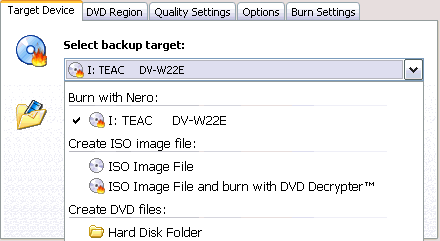
First options screen is the Target Device one. Here you just select what to do with the DVD files DVD Shrink will create. The first option is to burn the files with Nero (you must have it installed). If you have CopyToDVD installed this option will appear also. Also you can create an ISO file and, if you want, burn it afterwards with DVD Decrypter. Be careful because this does not mean you can burn just with DVD Decypter as you need Nero installed again to create the ISO file. Finally you can just output the files in a hard disk folder and then decide how to burn them.
The "Select folder for temponary files option" above the back-up target one (hidden by the menu here) is the location that DVD Shrink will put the DVD files before burning them. Make sure the hard disk you select has enough free space and that you remember where they are as you have to delete them manually after the burn.
We are not going to go through the DVD Region tab, as you just leave everything to default (just select Region Free and leave Provider ID empty). Now you are ready to click the Quality settings tab.


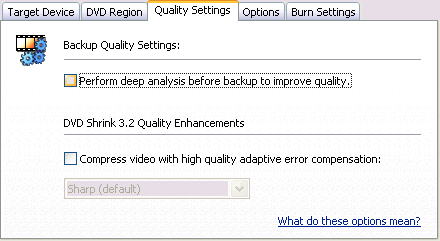
Here the things are pretty simple. If you want the encoding to take the less possible speed leave these two options unselected. This will increase the speed. In the other hand if you want to have the best possible quality you should enable both of them, but be ready for a long encoding time. If you click the "What do these options mean?" link in that window you can read more about these options in DVD Shrink's help. For your convenience I have uploaded this document and you can read it here.
Now click the Options tab.


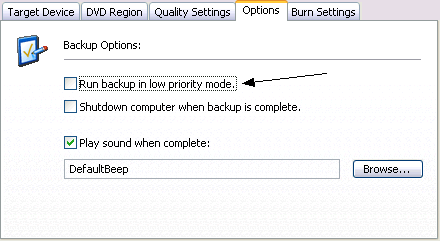
Here select "Run backup in low priority mode" if you want to use your PC while DVD Shrink will encode. If not (I suggest you leave it alone!) then deselect it. The other two options are obvious so make your selections and then click the Burn Settings tab.


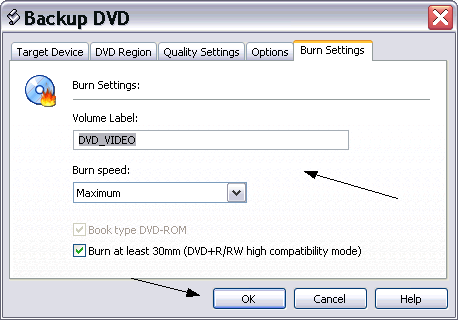
Here just type the label you want your DVD disc to have and select a burn speed (Maximum is fine usually). Then click OK and the encoding begins!


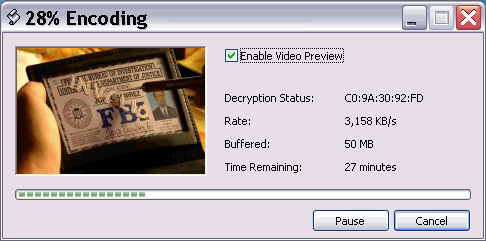
After that the encoding will begin. Depending on your PC and the settings you have selected it should take from 30mins to 2hours. After that, depending on your option a new window will come up to burn the DVD or create the ISO image.
You now think you are a DVD Shrink master don't you? Not yet! You have successfully made a backup but lets have a look at another useful small thing!

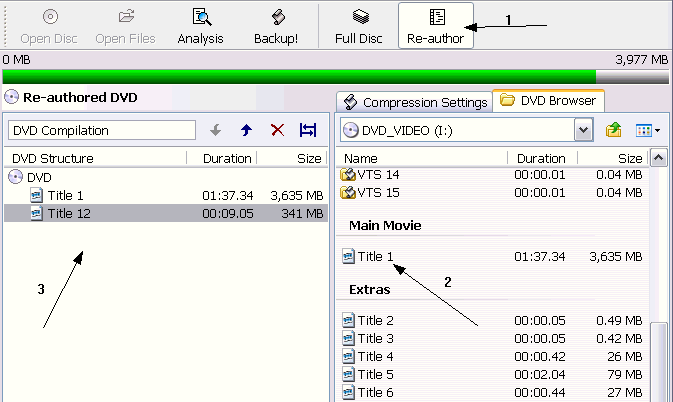
The little thing you need to know about is re-author mode. Let's have a look.


To enable re-author mode click the button in the toolbar (1). What this mode does is pretty simple. It authors the DVD again so that you just keep only what you need. When you press the button the screen changes like the picture above. From the DVD Browser (2) you can drag-and-drop the tracks you want to keep in the Re-authored DVD area in the left (3).
Here's the point that needs some more explaination. You can add whatever you want, BUT the menus will NOT work. Which means that you'll see the menu animations like a video and you won't be able to make any selections. So you understand that you should not add the menus.Without the menus though, there is no easy way to see the extras (you need to use your standalone's controls to move between the tracks, not being able to see which track is what).
So you easily understand that the re-author mode is meant to be used when you want to keep just the main movie. Actually re-author is the best way to copy big films like Lord Of The Rings and others over 3 hours. When you want to keep the menus and some extras use the guide as we showed above. When you just want to keep the main movie, use re-author!

Well after this huge guide I hope you are a DVD Shrink master! If you face some problem don't worry, just come over to our forums and ask - we'll be glad to help!
Happy dvdshrinking!

Comments (66)Add Comment
To easy
written by albundy, August 18, 2005
I used Dvd shrink the other day for the first time
and it worked like a charm , the first disk said it was dirty or had a fingerprint on it , so i did it for a second time and it burnt in under 20 min on my laptop. Thanks for a very good product. I highly recommend it, very easy to use and I am a novice .
Thanks again
Does this need decryption?
written by shreeit, August 27, 2005
In fig2 in step 2 shows decryption status with some code. Does that mean you need to decrypt before shrink? When I try with that type of code my dvd never complete. once it reach 100%, it start again

-shreeit
...
written by Moddie, March 09, 2007
Your instructions were very simple to follow, but can you make a guide for the actual burning process? How to pull it up to start burning the dvd!
dude
written by guy pants, March 19, 2007
dude this may not be heaven but its **** close
Afterwards
written by Unnamed, April 15, 2007
Yo, the prgram worked fine and I am not sure what to do after the DVD process is complete. I want to burn it all to dvd and have nero home esseintials, DO i just select everything and burn to disc?
Wrong audio track
written by Tredwin, April 19, 2007
I have done everything said and having re-authored the DVD, and selecting main movie or title 1 (whichever required) I then preview and the soundtrack is as expected. I then shrink the DVD, drag it into the convertor and when I play the m-peg4 movie the soundtrack is the directors overlay version. How do I get the correct soundtrack and why does the preview not have the directors overlay soundtrack.
awesome program!
written by T, April 22, 2007
The guide you wrote I followed to the "Letter"...ie.. Exactly!! I burned a backup coly of my "Volcano" movie on a Memorex 16X DVD R on my Philips8631 DVD-RW Write on my comp. I used Nero 6.0 and burned at 16X speed my movie turned out PERFECTLY and plays like my original copy on my Toshiba SD3990!!!
...
written by edward knowles, May 11, 2007
i get the invalid dvd navigation structure mainly on sony dvds
Quality Settings on Back Up Tab
written by Richard lewis, July 04, 2007
Recently I have been using the Deep Analysis button and the other button as well. I now find these buttons are no longer available for use. I have reloaded DVD Shrink but still no joy. Can anyone advise on what I can do??
splits!
written by paul roberts, July 15, 2007
dvd shrink splits my movies into 3 bits!. HOW CAN I PREVENT THIS?!
thanks
paul
...
written by m.a. de boer, July 15, 2007
no comment
let me just, Low-rated comment [Show]
...
written by Flemming Jensen, August 02, 2007
It is a good software you have
mr
written by roger brown, August 06, 2007
have not got the hang of reauthored yet
mr
written by roger brown, August 06, 2007
still having problems copying dvds please email me instructions
...
written by Alejandro, September 04, 2007
Yo nescito un programa para comprimir peliculas
comprimir films
written by Alejandro, September 04, 2007
I NEED PROGRAMS FOR THE FIMS FOR MI
Comprimir peliculas
written by Ale, September 04, 2007
Yo quiero un programa para comprimir peliculs
...
written by PACIFIC, September 27, 2007
you can download it for free!!!just serch in google (dvd shrink free download) and that's it!!!By the way tnx for support because i learn from here how to use the dvdshrink
...
written by huyenduong, October 14, 2007
my dvd get error message:
dvd encountered an error and cannot continoue
...
written by dalibor, October 17, 2007
i use ripitforme vrs. 1.7.1.0 which opens dvd decrypter vrs. 3.5.4.0 automatically and encodes the movie into a file form, i use dvd decrypter to burn the movie on one disk thanks to dvd shrink , dvd shrink also transforms the file form into an iso image, dvd decrypter can only burn iso image files. these programs are all free could be tough to find on the internet though. the best ripit4me vrs. is 1.7.1.0(the last version since it got shut down but you prob can still find on the net) the previous versions werent as good as 1.7.1.0..i just burned transformers and evan almighty. using these 3 programs you can burn any dvd garanteed and they are all free. i have all three programs saved, they can be a bitch to find
...
written by mattyeo, October 21, 2007
I just decrypted a surfing dvd using your great software. i opened the file that i downloaded it to and i found an Audio_TS file w/ nothing in it, and the other file titled Video_ts has 13 files w/ most of them not doing anything and the one large video file is a little choppy. do you know what i am doing wrong? i read your tutorial and it was very helpful, thank you
...
written by kaylon, October 29, 2007
i can use this program i just want to know how to make a movie that is more than two hours fit onto a two hour disc
Does not show Nero as a target device.
written by Zomg NERO, November 28, 2007
I have nero start smart installed and then i go to set my back up target to burn but i have no option for it. How do i fix this? please help me
can get it to work. i mean the dvd shrink.
written by candyman, December 01, 2007
after i do all the encoding and burning. when i play the dvd in the dvd player. it only plays one part of the movie.
Will this work with a laptop?
written by anonymousperson, December 03, 2007
I don't have a PC but a Toshiba laptop. Will that work?
Does Not Show Nero As A Target Device
written by Marla Flores-Jauregui, December 05, 2007
I have Nero StartSmart installed on my PC; when I go to set "my back up target" to burn but i have no option for it. How do i fix this? please help me
Nero?
written by jake rebello, December 25, 2007
i have been using dvd shrink for over a year and my computer had to be restore and when i downloaded dvd shrink again i can't get it to work the same. i installed nero ,but when i click on backup the icon burn with nero doesn't pop up any more. there is only iso image file and hard disk folder. how do i get the option to burn to dvd back?
Please Help
written by Bubu, January 03, 2008
I tried and there is message Invalid DVD Navigation Structure! Need help how fix the the problem or it there a software that i need to get for that?
Come on people
written by Biju Biju, January 05, 2008
Folks,
Have you seen how old this site is? Have you seen any responses to people's problems since 2005? Try using Goggle to find your answers.
ghjhjklkl
written by baba killer, January 14, 2008
jhgjkllmmùm**tyyiuioip
dvd good dfsdgfhgjhkjkkjlazezretrtty
written by baba killer, January 14, 2008
goodhjhkjkjlkllkmvbnbopfhghghjb
my opinion
written by john citizen, January 18, 2008
very good brief guide
i needed this
i didn't take long to read
VERY GOOD smilies/smiley.gif
frustrated
written by Debbie t, January 20, 2008
DVD Shrink used to work very well but now I keep getting error message on every one I try to copy. Redundency error mostly. Any suggestions????
shrinker
written by me and i, January 23, 2008
so is it possible to be able to shrink two or three movies on one disc?
sick program
written by DJ, January 24, 2008
yo dudes was up this is a sick program and i will definetly use it again
Thanks for the guide - very useful
written by A DVD-Shrink Virgin, January 29, 2008
Really good guide which got me up and running in no time, thanks for taking the time to do this.

BurniNg the File
written by asdsa, February 11, 2008
when i burn the backed file it won't play on any dvd players but rather just just the file name on the dvd menu
...
written by chromedome, February 13, 2008
usink shrink, how do i get my drive to show up when i click backup
Deleting Info Once DVD Backed Up?
written by Rikmac78, February 13, 2008
I backed up my son's DVDs last year as he's prone to scratching them at times. I always saved the movies in a particular folder, and delete them once backed up. I had to make a second back up of one disk last week, and noticed that DVD Shrink remembered the disk info. How do I delete this from my hard drive?

Thanks!
Problem over and over
written by ryan2, February 20, 2008
8K24-0227-1105-EKK5-5000-0023-****

Windows XP 5.1
IA32
WinAspi: -

NT-SPTI used
Nero API version: 8.2.8.0
Using interface version: 6.3.1.4
Installed in: Csmilies/tongue.gifrogram FilesNeroNero8Nero Burning Rom
Application: aheadNero - Burning Rom
Internal Version: 8, 2, 8, 0

Recorder: Version: JWS5 - HA 1 TA 0 - 8.2.8.0
Adapter driver: HA 1
Drive buffer : 2048kB
Bus Type : default

=== Scsi-Device-Map ===
DiskPeripheral : WDC WD600BB-75CAA0 atapi Port 0 ID 0 DMA: On
DiskPeripheral : WDC WD800BB-75CAA0 atapi Port 0 ID 1 DMA: On
CdRomPeripheral : Memorex DVD16 /-DL4RWlD2 atapi Port 1 ID 0 DMA: On
CdRomPeripheral : LITEON DVD-ROM LTD163 atapi Port 1 ID 1 DMA: On

=== CDRom-Device-Map ===
Memorex DVD16 /-DL4RWlD2 F: CdRom0
LITEON DVD-ROM LTD163 E: CdRom1
=======================

AutoRun : 1
Excluded drive IDs:
WriteBufferSize: 70254592 (0) Byte
BUFE : 0
Physical memory : 478MB (490476kB)
Free physical memory: 171MB (175224kB)
Memory in use : 64 %
Uncached PFiles: 0x0
Use Inquiry : 1
Global Bus Type: default (0)
Check supported media : Disabled (0)

20.2.2008
NeroAPI
7:17:44 PM#1 Phase 112 File APIProgress.cpp, Line 285
DVD-Video files reallocation started

7:17:44 PM#2 DVDREALLOC -21 File DVDVideoCompilation.cpp, Line 1328
Required file 'VIDEO_TS.VOB' is not present

7:17:44 PM#3 Phase 115 File APIProgress.cpp, Line 285
DVD-Video files reallocation failed

7:17:44 PM#4 Text 0 File NeroAPIBurnFS.cpp, Line 218
Failed to realloc DVD video files


Existing drivers:

Registry Keys:
HKLMSoftwareMicrosoftWindows NTCurrentVersionWinLogonAllocateCDROMs : 0 (Security Option)

how to burn a dvd movie
written by kikinne, February 29, 2008
what do you do first shrink it or burn it really trying this for a long time and still don`t understand
Wont burn
written by Chuck M, April 19, 2008
I do all these steps, then when nero trys to burn, It will tell me the Dvd-r doesnt have enough space on disc. Cant someone please help me, This e-mail address is being protected from spambots. You need JavaScript enabled to view it ... yahoo messenger : Chuckychuck20
shrink
written by valeria, July 16, 2008
veri gut
dvd shrink
written by marvin101, October 04, 2008
where do we get the dvd shrink that is free
...
written by johnksoy, May 08, 2009
Keep it simple. Analyze> Backup> Then Burn
...
written by Bobby Damceski, May 24, 2009
on my dvd shrink is messing up cos my cuz was delete-ing some stuff now it not coping... HELPsmilies/angry.gif
smilies/kiss.gif
it works perfectly :D
written by wouldnt u like to know, July 11, 2009
been using dvd shrink for a few years now and only ever had 2 bad disks
how do u burn dvd shrink it self i need help
written by mad cows, July 19, 2009
hey guys my dvd shrink i cant burn dvd on it can u guys tell me how to do it thankd
Cyclic Redundancy Check
written by fvygjfyjtf, July 21, 2009
hello my name is james i need some help
with this DVDshrink its great but i used it once
and it came up saying Cyclic Redundancy Check???
what does that mean and i couldn't burn my movie
what do i do???
Not Working?
written by ., July 25, 2009
After the encoding, that takes between 30min and 2hrs, what do you do next?
Copy DVD with Wondershare DVD Copy
written by susanzhai, August 04, 2009
I do not like to use DVD Shrink. I prefer Wondershare DVD Copy. It is very easy to use and the DVD quality is high. smilies/tongue.gif
Not Working
written by Pertmaster24680, August 18, 2009
Both times i have used it it has not worked might be the DVD player but i don't think so Could U please Help
can't copy
written by kostakis, September 06, 2009
I have been trying to copy a DVD which I borrowed from the dvd shop with dvd shrink.Then once it got to the stage of burning the dvd it wouldn't burn it.What shall I do ? ? ?
wow
written by docvingt, September 06, 2009
dude, this is one of the best "guides" ever. I congratulate you on such a beautiful instruction "manual"
Plz help!!
written by Cherie chu, October 08, 2009
I just started using DVD Shrink today, and I looked like I'm lost. I tried to burn this movie into my hard drive computer. After copying and everything, it saved on my Desktop with two folders name Audio and Video. I'm just wondering how do you play that movies.
Thanks a lot.
smilies/smiley.gif
owner
written by Kirk Yates, November 02, 2009
Everything seems to work with the DVD Shrink 3.2 until the end after it gets done backing up the movie to my computer. After that it will not spit out the DVD so that i can put an empty DVD in it to record! When I first downloaded the program it worked just fine. I removed and re-downloaded the program but it still does the same thing. What do I need to do to fix this problem?
too much disk data?
written by experienced user, December 02, 2009
I have used dvd shrink many times to back up my dvd movies but reciently I've come across a new problem. After opening a disk the MB bar, which is usually mostly green, is mostly red. After changing to custom ratio The slider is positioned all the way left. Leaving me unable to adjust the bar to all green. I thought the dvd might be too long, so I tried smaller ones and the problem happened again. Is there a way to fix this or am I screwed?
...
written by Zora, December 17, 2009
I've made three coasters so far. I get as far as burning the DVD, it starts to burn, and then I get a message saying "communication failure" and the whole process shuts down, having ruined a DVD. I've got two brand-new Sony Optiarc DVD burners, SATA, just installed. Connected to the mobo at SATA 2 and SATA 3.

Please, if anyone is reading this, advise!


Here's the log:

12:11:43 AM#19 Phase 36 File APIProgress.cpp, Line 276
Burn process started at 8x (11,080 KB/s)

12:11:43 AM#20 Text 0 File ThreadedTransferInterface.cpp, Line 2654
Verifying disc position of item 0 (relocatable, disc pos, no patch infos, orig at #0): write at #0

12:11:43 AM#21 Text 0 File Cdrdrv.cpp, Line 8862
---- DVD Structure: Physical Format Information (00h) ----
Layer: 0, Address: 0 (0 h), AGID: 0; Length: 2050
Book Type: DVD+R (10), Part Version: 1.0x (1)
Disc Size: 120 mm, Maximum Rate: (F h)
Number of Layers: 1, Track Path: Parallel Track Path (PTP), Layer Type: recordable
Linear Density: 0,267 um/bit, Track Density: 0,74 um/track
Starting Physical Sector Number of Data Area: 30000 h (DVD-ROM, DVD-R/-RW, DVD+R/+RW)
End Physical Sector Number of Data Area: 26053F h
End Sector Number in Layer 0: 0 h (LBN: FFFD0000 h, 4193920 MB)
Data in Burst Cutting Area (BCA) does not exist
Disc Application Code: 0 / 0 h
Extended Information indicators: 7 h
Disc Manufacturer ID: CMC.MAG.
Media type ID: M01
Product revision number: 0
Number of Physical format information bytes in use in ADIP up to byte 63: 56
Media Specific [16..63]:
00 00 07 43 4D 43 20 4D - 41 47 00 4D 30 31 00 38 ...CMC.MAG.M01.8
23 54 37 18 00 3E 6E 00 - 70 62 15 15 0B 0B 08 08 #T7..>n.pb......
01 19 1B 0B 0B 0E 0F 01 - 00 00 00 00 00 00 00 00 ................

12:11:43 AM#22 Text 0 File DVDPlusRW.cpp, Line 665
Start write address at LBA 0
DVD high compatibility mode: Yes

12:12:00 AM#23 SCSI -1024 File Cdrdrv.cpp, Line 1434
SCSI Exec, HA 2, TA 0, LUN 0, buffer 0x015D0000
Status: 0x04 (0x01, SCSI_ERR)
HA-Status 0x00 (0x00, OK)
TA-Status 0x02 (0x01, SCSI_TASTATUS_CHKCOND)
Sense Key: 0x04 (KEY_HARDWARE_ERROR)
Sense Code: 0x08
Sense Qual: 0x03
CDB Data: 0x2A 0x00 0x00 0x00 0x10 0x80 0x00 0x00 0x20 0x00 0x00 0x00
Sense Data: 0x70 0x00 0x04 0x00 0x00 0x00 0x00 0x0A
0x00 0x00 0x00 0x00 0x08 0x03

12:12:00 AM#24 CDR -1024 File Writer.cpp, Line 311
Communication failure

12:12:00 AM#25 Text 0 File ThreadedTransfer.cpp, Line 228
all writers idle, stopping conversion

12:12:00 AM#26 Text 0 File ThreadedTransfer.cpp, Line 222
conversion idle, stopping reader

12:13:25 AM#27 Phase 127 File APIProgress.cpp, Line 276
Generating DVD high compatibility borders

12:13:25 AM#28 Phase 129 File APIProgress.cpp, Line 276
Generating DVD borders completed successfully

12:13:25 AM#29 Phase 38 File APIProgress.cpp, Line 276
Burn process failed at 8x (11,080 KB/s)

12:13:25 AM#30 Text 0 File AudioCompilationImpl.cpp, Line 867
DRM: DRM burn session terminated.

12:13:25 AM#31 Text 0 File AudioCompilationImpl.cpp, Line 896
DRM: Closing entire DRM handling. Bye.


Existing drivers:

Registry Keys:
HKLMSoftwareMicrosoftWindows NTCurrentVersionWinLogonAllocateCDROMs : 0 (Security Option)
...
written by lisa allan, January 05, 2010
i have been using dvd shrink for a long time but i want to know if i can copy 1 disk after the other using the same movie without haveing to keep putting the origonal dvd in to encode let me know thanks. othewise very pleased with product x smilies/grin.gif
Burning DVD of photographs I've taken
written by This e-mail address is being protected from spambots. You need JavaScript enabled to view it , January 08, 2010
I am assuming that I can put video's on a DVD of my grandchildren. I look forward
to this . Have never done it before. Cheryl Holub
Dirty disc error
written by This e-mail address is being protected from spambots. You need JavaScript enabled to view it , January 15, 2010
I sued dvd shrink before but on this occasion the first disc I backedup was fine, when it completed I loaded into my dvd player and all is well. I then proceeded to backup the remaining DVD's in the group and they all are getting dirty disc error. Any ideas what may be the problem?smilies/sad.gif
Need help
written by Bill Mesquite, January 18, 2010
I have already used dvd shrink to copy disks to hard drive and have had no problems. Now I am having problems with some of the newer dvd's. When it is in the analysing phase and anslyses about 30%, it pops up with drive f:1 not found. Is this a problem with new copy protection that dvd shrink cannot handle?
Disc Error after burning from nero
written by roniel david, January 20, 2010
There is an error after i burn the DVD,how can i resolve it?
great
written by nathan, January 28, 2010
smilies/grin.gif this helped alot thnks, no i kno how to byurn dvd's
HELP !!!
written by CSINTCA, February 26, 2010
Questions Abound…
First – Do ANY of these Older programs Still Work for Copying DVD’s with Today’s Advanced Copy Protections?? ( DVD-Shrink, DVDfab HD Decrypter, CloneDVD 2 )
It’s wonderful that these programs may have been the Best ( in their day ) and that you still continue to provide what looks like Excellent Guides, for those that have downloaded the programs in the past… However, If these No Longer “Do The Job’s they were designed to do” – see question 2.
Second – If advancements in Copy Protection have rendered these ( older ) programs Ineffective or Unusable, i.e. If they No Longer Work, then WHY does DVD-Guides.com STILL offer them for Download. WHY Waste Our Time?? ( Check the Bottom of this webpage for the Number or people that have downloaded these programs -–and probably Continue to Struggle with getting them to work today...)
Third – Do you people at DVD-Guides.com Ever Respond to ANY user comments??

Write comment
smaller | bigger

security code
Write the displayed characters


busy
 
DVD-Guides.com on Facebook

Who is online

We have 340 guests and 0 members online
No users online.